Buy RDS 2022 Device CAL Key (50 Devices) | KeysLocker
All Products
Office Windows Microsoft 365 Visio Project Server Bundles
Get CID
,

Microsoft RDS Server 2022 — 50 Device CAL — Online Key

$22.99

50 Remote Desktop Services (RDS) Device CALs for Windows Server 2022. Allows 50 devices to connect remotely, used by any user. Fast delivery.

What happens after you pay
  • Our team checks your order and emails your key — usually within a few minutes.
  • Your key and a step-by-step activation guide also stay on your order page.
Genuine Microsoft license Personal support chat 7 days to activate — guaranteed Secure checkout by Stripe
SKU: KL-RDS22-50D Categories: , Tags: , , , Brand:
Activation Online — enter the key and it activates
License One-time purchase — permanent
Covers 50 devices
Warranty Activate within 7 days — free replacement if it doesn't work
Delivery Checked by our team — usually within a few minutes

Buy RDS 2022 Device CAL — 50 Device Remote Desktop Licenses

License 50 devices with this genuine RDS 2022 Device CAL. Each RDS 2022 Device CAL lets any user connect from a licensed device to Windows Server 2022 via Remote Desktop.

What You Get

  • 50x RDS Device CALs for Server 2022
  • Fast delivery
  • Device-based licensing
  • Global activation

Device vs User CAL

How to Activate

  1. Open RD Licensing Manager
  2. Install your RDS 2022 Device CAL key
  3. CALs are ready

See our guide and Microsoft docs.

Is This Key Genuine?

Genuine Microsoft RDS 2022 Device CAL key. Covered by our activation guarantee.

  • 1 online product key for Microsoft Remote Desktop Services 2022 Per Device CAL, 50-device pack.
  • Loads 50 RDS Per Device CALs into the pool of a single Windows Server 2022 or later RD Licensing server.
  • Covers 50 endpoints connecting to Windows Server 2022, 2019 or 2016 RD Session Hosts, including access through RD Gateway and RemoteApp.
  • Perpetual 2022-version CALs. Nothing to renew and no per-user tracking to keep up to date.
  • Written steps for activating the license server, running Install Licenses, and setting the deployment to Per Device mode.
  • Delivered to your order page, usually instantly and at most a few minutes after payment. We email you a link too.
  • Not included: Windows Server 2022 core licenses, Windows Server CALs, or RDS Per User CALs.
  • Version rights: licenses RD Session Hosts on Windows Server 2022, 2019, 2016 and earlier. Windows Server 2025 hosts require 2025 CALs.
  • License server: RD Licensing role on Windows Server 2022 or later, activated with the Microsoft Clearinghouse. The same server can hold this pack alongside older CAL versions.
  • Licensing mode: deployment licensing mode set to Per Device. Mode is a deployment property, not a per-collection setting, so every session host in the deployment shares it.
  • What one CAL covers: a single device and everyone who signs in from it, including access via RD Gateway, RD Web Access and RemoteApp, with no extra license class for those roles.
  • Counting rule: CALs are consumed per distinct device, never per concurrent session.
  • Also required: Windows Server 2022 CALs per user or device, plus Standard or Datacenter core licenses for each host.
  • Host core licensing: all physical cores licensed, minimum 8 per processor and 16 per server, in 2-core packs. Standard covers 2 operating system environments, Datacenter unlimited.
  • Host capacity: Windows Server 2022 supports up to 48 TB of RAM per host, against 24 TB on Windows Server 2019.
  • Security baseline: secured-core server support and TLS 1.3 in the operating system.
  • Grace period and reclaim: 120-day grace window on a new host before sessions are refused; up to 20 percent of installed Per Device CALs can be revoked in Licensing Manager.
  • Lifecycle: Windows Server 2022 extended support ends 14 October 2031.
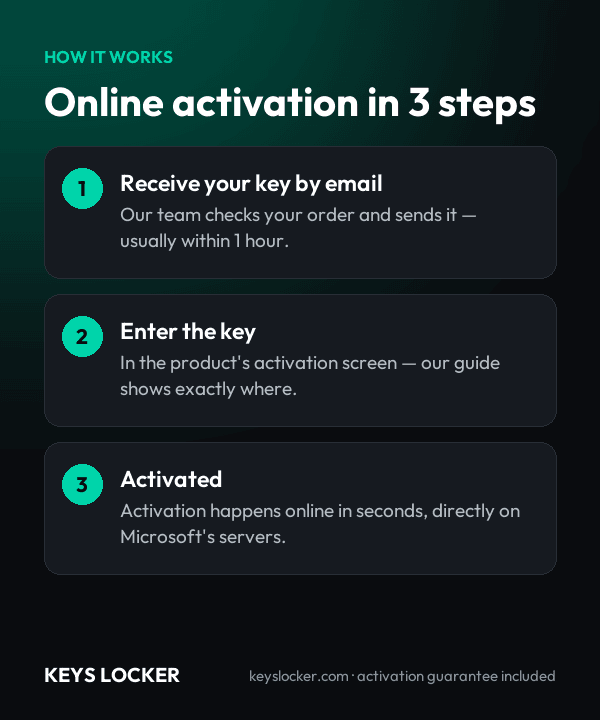
  1. Purchase — Complete your order securely
  2. Receive Key — Your key appears on your order page right after payment, and we email you a link. Click “Reveal key” to see it
  3. Activate — Enter the key during product setup or in Settings > Activation
★

No reviews yet. Be the first to share your experience!

Be the first to review “Microsoft RDS Server 2022 — 50 Device CAL — Online Key”

★ ★ ★ ★ ★
How this key works

The CAL pack is installed on your Remote Desktop license server with RD Licensing Manager.

Reinstalling

If you rebuild the license server, install the pack again with the same key.

New hardware

Replacing a workstation or a user does not need a new pack — the license server reassigns CALs.

Compare all key types — OEM, Retail, phone, Microsoft account →

Frequently Asked Questions

No. A 2025 RD Session Host requires 2025 RDS CALs, because version rights only run downward. These 2022 CALs stay perpetually valid for 2022, 2019 and 2016 hosts, and a Windows Server 2025 license server can hold both pools, so a phased migration keeps older hosts on this pack while new hosts use 2025 CALs.

No. RDS is not concurrent-use licensing. Each distinct device that connects takes one CAL from the pool and holds it until it expires or is revoked, whether it connects once a week or stays signed in all day. Fifty CALs cover fifty machines, so a fifty-first endpoint needs another CAL even if the sessions never overlap.

When people outnumber machines instead of the reverse. One hybrid worker using an office PC, a laptop and a home desktop consumes three Device CALs, so this pack would run out at roughly sixteen such staff. Hot-desking across a large floor has the same effect. Count endpoints first and choose Per User if the ratio falls below one.

On Windows Server 2022 or later, since a license server can only install CAL versions up to its own operating system. It can share a machine with the Connection Broker or a lightly used host, but activate it against the Microsoft Clearinghouse before installing the pack, otherwise only temporary licenses are issued.

No additional license class. RD Gateway, RD Web Access and RD Connection Broker are Windows Server roles covered by the RDS CAL the connecting device already holds. Device count is what matters: a contractor laptop reaching the farm across the gateway takes one of the fifty exactly like an internal desk PC.

A 2022 host addresses up to 48 TB of RAM against 24 TB on 2019, which matters when many shared terminals are consolidated onto few hosts. It also brings secured-core server support and TLS 1.3 in the operating system. Extended support runs to 14 October 2031, giving a device pool bought now a long runway.

Usually instantly, and at most a few minutes depending on demand and stock. Your key appears on your order page as soon as your payment is confirmed, and we email you a link to it. The key stays hidden until you click Reveal key.

Send our support team your order number and a screenshot of the activation error. Most problems are an edition mismatch or a typo, and we'll help you fix it. If the key really is faulty, we send a free replacement within 24 hours — or a full refund if we can't replace it.

7-Day Activation Guarantee

Activate your key within 7 days of purchase. If it doesn't activate, we send a free replacement — or a full refund if we can't replace it.

Recently Viewed

Scroll to Top