 Office
  Windows
  Microsoft 365
  Visio
Visio  Project
  Server
  Bundles
Microsoft Office 365 for one person, for a full year.
The complete Microsoft Office 365 apps (Microsoft’s current name for it is Microsoft 365) – Word, Excel, PowerPoint, Outlook and OneNote – plus 1 TB of OneDrive, all on your own Microsoft account.
Best for: anyone who wants the real Microsoft Office 365 experience – the full desktop Office apps and a terabyte of cloud storage – without paying for an entire household plan.
This is an invitation, not a product key.
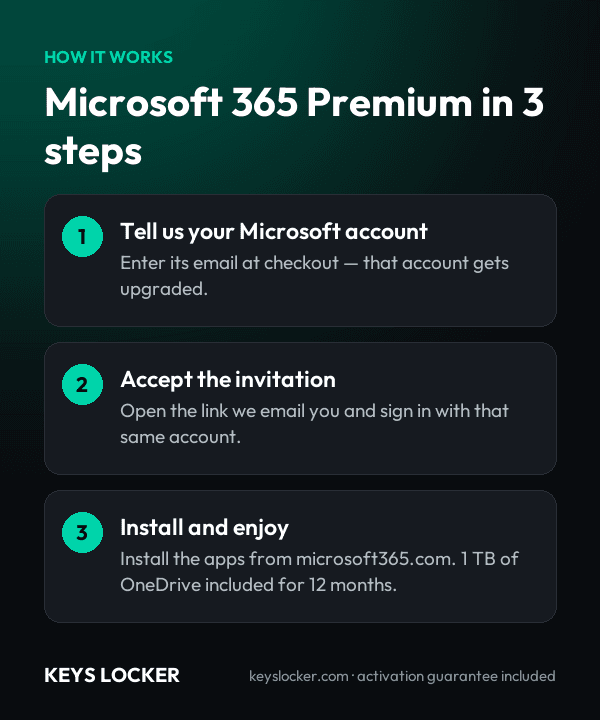
You are joining an active Microsoft 365 Premium subscription. After checkout we send you an invitation link. You accept it with your own Microsoft account, and that account is upgraded to full Microsoft 365 for 12 months. There is no 25-character key to type in and nothing to install before you join.
Your account stays yours.
This is the part most people ask about, so it is worth being clear. Joining a family group does not merge your data with anyone else’s. Your files, your OneDrive, your email and your settings all live in your own Microsoft account and are invisible to every other member of the group. Microsoft built family sharing so that each member’s storage and documents stay completely private – the organizer cannot see your files, and neither can anyone else.
What you actually get
- 1 TB of OneDrive storage – allocated to your account alone. It is not pooled and not shared.
- The full desktop Microsoft Office 365 apps – Word, Excel, PowerPoint, Outlook and OneNote, installed locally rather than run in a browser tab.
- Every platform – Windows, macOS, iOS, iPadOS, Android and the web apps.
- Five simultaneous sign-ins – install on as many devices as you own and stay signed in on five at once.
- 12 months, counted from the day you accept the invitation rather than the day you order.
- Always the current release – subscription Office updates itself, so you never fall behind a version.
Subscription or a one-time key – which do you want?
Choose this subscription if you want the newest features, cloud storage, and Office on your phone and tablet as well as your PC. If you would rather pay once and keep a fixed version forever with nothing to renew, look at Office 2024 Professional Plus instead – it never expires, but it includes no OneDrive storage and no mobile apps.
What this seat does not do
You join as a member, not as the group organizer. Microsoft only allows the subscription holder to send invitations, so you cannot invite other people or re-share the subscription. Copilot and the AI credits are not included either – Microsoft restricts all AI features to the subscription owner, so they cannot be shared with anyone who joins a group. Everything else – the desktop apps, your 1 TB of OneDrive and Microsoft Defender – works exactly as it would on your own plan. If you need to cover several people, message us before ordering and we will point you to the right option.