
Buy Project 2021 Professional Phone Key | KeysLocker
All Products
Office Windows Microsoft 365 Visio Project Server Bundles
Get CID
,

Project 2021 Professional – Phone Activation Key

$9.49

Project 2021 Professional, activated by phone. Gantt charts, resource levelling and critical path planning, bought once.

Choose how you activate
Phone activationCheapest. Free Confirmation ID from our Get CID page — no call. $9.49 Selected
Online keyEasiest. Enter the key and it activates over the internet. $14.99 View
What happens after you pay
  • Your key appears on screen and in your email within seconds.
  • You also get an activation code for your free Confirmation ID — no phone call needed.
  • A step-by-step activation guide comes with your key.
Genuine Microsoft license Personal support chat 30 days to activate — guaranteed Secure checkout by Stripe
SKU: KL-PRJ21-PRO-PH Categories: ,
Activation By phone — free Confirmation ID included
License One-time purchase — permanent
Devices 1 PC
Warranty Activate within 30 days — replacement or refund if it doesn't work
Delivery Instant to a few minutes, depending on demand and stock — on screen and by email

Best for: planners and site managers who need proper scheduling software once, rather than a monthly Project Plan subscription.

What you actually get.
Project Professional is the desktop scheduling tool: Gantt charts, task dependencies, automatic critical path calculation, resource levelling to resolve over-allocation, baselines for tracking slippage, and the reporting views that turn all of it into something a client will read.

Professional versus Standard.
Professional adds resource management across projects, the Team Planner view and the ability to connect to Project Server or Project Online. If you only schedule single, self-contained projects, Standard would do — but Professional is what is stocked here and is the one most people want.

Before you buy: Microsoft support for the 2021 perpetual releases ends in October 2026. The software keeps working; it simply stops being updated. Activation is by phone and takes about two minutes through our Get CID page.

  • 1x genuine 25-character Microsoft product key
  • 1x activation code for your free Confirmation ID
  • Instant email delivery after payment
  • Step-by-step phone activation guide
  • Invoice / proof of purchase
  • Activation method: phone activation, completed online through our Get CID page.
  • Edition: Project Professional 2021 — includes Team Planner, resource levelling and Project Server connectivity.
  • Support: Microsoft updates for the 2021 perpetual releases end in October 2026. The licence does not expire.
  • Platform: Windows 10 and Windows 11 (64-bit). Project has no Mac version.
  • Devices: one PC, permanent licence, installs alongside Office.
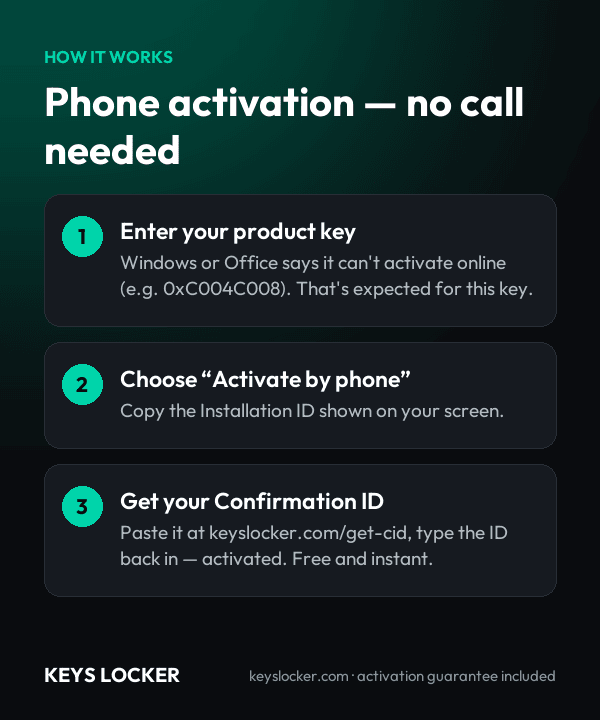
  1. Order — your key and activation code arrive by email within minutes.
  2. Install and enter the key when prompted.
  3. Choose telephone activation when the online attempt cannot complete; note the Installation ID.
  4. Get your Confirmation ID at keyslocker.com/get-cid using your activation code.
  5. Type it in to finish. The licence is permanent.
★

No reviews yet. Be the first to share your experience!

Be the first to review “Project 2021 Professional – Phone Activation Key”

★ ★ ★ ★ ★
How this key works

Activated by phone: enter the key, choose Activate by phone, and get your Confirmation ID free and instantly on our Get CID page — no call needed.

Reinstalling

The Confirmation ID matches this installation. After reinstalling Project or a major hardware change you will see a new Installation ID — just repeat the phone steps. Need another Confirmation ID for this key? Message us from your order page and we will issue it.

New computer

Yes. Stop using it on the old PC, then activate on the new one with the phone steps.

Compare all key types — OEM, Retail, phone, Microsoft account →

Frequently Asked Questions

Professional adds cross-project resource management, the Team Planner view for dragging work between people, and the ability to connect to Project Server or Project Online. Standard handles single projects only.

No. Project Plan 3 is Microsoft’s subscription, billed monthly and including the web app. This is the perpetual desktop release: one payment, no renewal, installed on your PC.

Project 2021 opens .mpp files from earlier versions and from Project Online desktop. Features introduced after 2021 will not appear, but the schedule itself opens.

Instantly. Key and activation code by email within one to five minutes of payment.

No. It works entirely standalone on your PC. Server connectivity is an option Professional makes available, not a requirement.

Send our support team the activation error and we will replace the key or refund you within 24 hours.

30-Day Activation Guarantee

Activate your key within 30 days of purchase. If it doesn't activate, we send you a replacement or a full refund.

Recently Viewed

Scroll to Top