Buy Windows Server 2016 Essentials Key | KeysLocker
All Products
Office Windows Microsoft 365 Visio Project Server Bundles
Get CID
,

Microsoft Windows Server 2016 Essentials — Online Key

$6.99

Genuine Windows Server 2016 Essentials license key with fast delivery. Purpose-built for small businesses with up to 25 users and 50 devices. No CALs required.

What happens after you pay
  • Our team checks your order and emails your key — usually within a few minutes.
  • Your key and a step-by-step activation guide also stay on your order page.
Genuine Microsoft license Personal support chat 7 days to activate — guaranteed Secure checkout by Stripe
SKU: KL-WINSRV16-ESS Categories: , Tags: , , , Brand:
Activation Online — enter the key and it activates
License One-time purchase — permanent
Covers 1 server
Warranty Activate within 7 days — free replacement if it doesn't work
Delivery Checked by our team — usually within a few minutes

Buy Windows Server 2016 Essentials Key — Cheapest Small Business Server

Get a genuine Windows Server 2016 Essentials key — the most affordable Windows Server license available. This Windows Server 2016 Essentials key supports 25 users and 50 devices with no CALs required. File sharing, backup, remote access, and Active Directory included.

What You Get

  • 1x genuine Windows Server 2016 Essentials key
  • Fast delivery
  • 25 users, 50 devices
  • No CALs required
  • Global activation

Newer Version

See our Server 2019 Essentials key for a newer release.

How to Activate

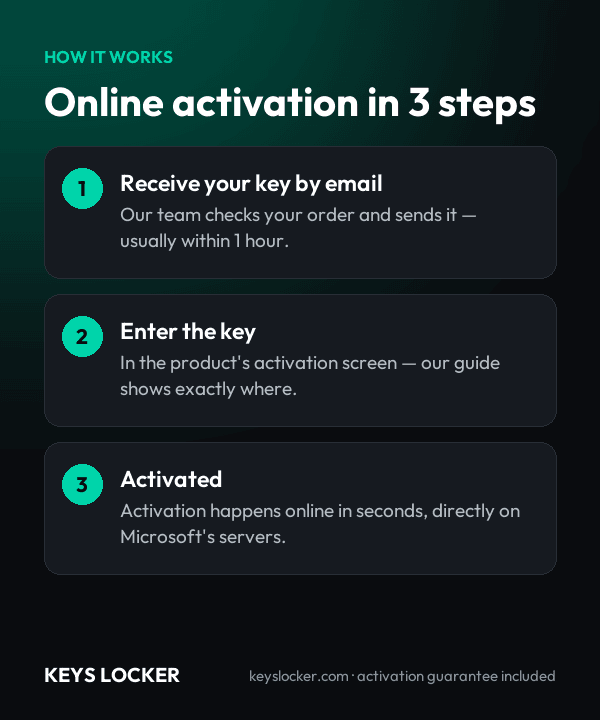
  1. Download from Microsoft
  2. Enter your Windows Server 2016 Essentials key
  3. Activates through Microsoft servers

See our server guide.

Is This Key Genuine?

Genuine key. Your Windows Server 2016 Essentials key activates on official servers. Covered by our activation guarantee.

  • One Windows Server 2016 Essentials product key valid for a single server installation, delivered by email.
  • Activation of the Essentials edition itself, including built in access rights for up to 25 users and 50 devices with no separate CALs to purchase.
  • Written activation steps for both the Settings activation screen and the slmgr command line, for servers with or without a browser.
  • Guidance on downloading official Microsoft Windows Server 2016 Essentials installation media, so the installed edition matches the key.
  • First run notes covering forest and root domain controller creation, Connector setup for client PCs, and enabling client backup in the Essentials dashboard.
  • Licensing model: one server license covering one physical server. Essentials is licensed per server, not per core, so there is no 16 core minimum and no core packs to add.
  • Access rights: up to 25 user accounts and 50 devices are included in the server license. No Windows Server CALs are required, and none can be added to raise the cap.
  • Processor limit: servers with up to two physical processor sockets are supported.
  • Memory limit: 64 GB of RAM across up to two sockets, the highest hardware ceiling any Essentials release reached.
  • Instance rights: one instance in a physical operating system environment plus one in a virtual one; when both run, the physical instance may only host and manage the virtual machine.
  • Essentials Experience: installed by default in this release, providing the Essentials dashboard, client PC backup, Remote Web Access and the Office 365 and Azure Active Directory integration wizards.
  • Directory requirement: with the Essentials Experience in place, the server acts as the root domain controller of its own forest and cannot hold domain trust relationships.
  • Installation option: Desktop Experience (full GUI). Server Core is not an installation option for the Essentials edition.
  • Minimum hardware: 1.4 GHz 64 bit processor, 2 GB RAM, a 160 GB drive with a 60 GB system partition, and at least one Ethernet adapter.
  • Client PCs: Windows client machines join through the Connector software published by the server; the server itself must be reachable on the local network for setup.
  • Activation: online activation over the internet, one activation per license. Because setup also promotes the box to a domain controller, activate before running the Essentials configuration wizard.
  • Edition matching: the key activates Windows Server 2016 Essentials only. It will not activate Standard, Datacenter, or the 2019 or 2022 releases.
  • Downgrade media: older release media and keys are not supplied with this license, so install the 2016 Essentials edition that matches the key.
  • Support lifecycle: mainstream support ended January 11, 2022; extended support with security updates runs to January 12, 2027.
  1. Purchase — Complete your order securely
  2. Receive Key — Your key appears on your order page right after payment, and we email you a link. Click “Reveal key” to see it
  3. Activate — Enter the key during product setup or in Settings > Activation
★

No reviews yet. Be the first to share your experience!

Be the first to review “Microsoft Windows Server 2016 Essentials — Online Key”

★ ★ ★ ★ ★
How this key works

Enter the key in Server Manager or with slmgr /ipk; it activates online.

Reinstalling

After reinstalling the same server, enter the key again.

New hardware

One license covers one server.

Compare all key types — OEM, Retail, phone, Microsoft account →

Frequently Asked Questions

No. Essentials is sold as a single server license that already includes access rights for up to 25 user accounts and 50 devices, so there are no Windows Server CALs to buy, install or track. If you outgrow those ceilings the move is to Standard or Datacenter, which are licensed per core and do require CALs.

Usually instantly, and at most a few minutes depending on demand and stock. Your key appears on your order page as soon as your payment is confirmed, and we email you a link to it. The key stays hidden until you click Reveal key.

The edition is capped at 25 user accounts and 50 devices. Both ceilings apply at the same time, so 25 staff with a laptop and a phone each land exactly on both limits, while 20 staff with three devices each hit the 50 device cap with five user slots still unused. That cap is part of the license rather than a trial restriction, and adding hardware does not raise it.

Windows Server 2016 Essentials installs the Essentials Experience by default. It provides the Essentials dashboard, scheduled backup of connected client PCs, Remote Web Access for browser based file and remote desktop access, and setup wizards that link the server to Office 365 and Azure Active Directory. The 2019 Essentials release removed all of it.

Yes. Setup promotes the server to the root domain controller of its own new forest, and the edition's licensing requires it to remain the only domain controller, hold all FSMO roles, and avoid two way trusts with other domains. That suits a standalone small office rather than a branch attached to an existing Active Directory forest.

Up to two physical processor sockets and 64 GB of memory. Core count is irrelevant because Essentials is licensed per server, not per core, so there is no 16 core minimum to fund. The license covers one instance in a physical operating system environment plus one in a virtual one, but when both run the physical instance may only host and manage the virtual machine.

Send our support team your order number and a screenshot of the activation error. Most problems are an edition mismatch or a typo, and we'll help you fix it. If the key really is faulty, we send a free replacement within 24 hours — or a full refund if we can't replace it.

Mainstream support ended on January 11, 2022, so the product sits in extended support: security updates only, with no new features. Extended support runs until January 12, 2027. If you need a longer runway on a small business server, compare this page against the 2019 Essentials release before deciding.

7-Day Activation Guarantee

Activate your key within 7 days of purchase. If it doesn't activate, we send a free replacement — or a full refund if we can't replace it.

Recently Viewed

Scroll to Top