Buy Windows Server 2016 Standard Key | KeysLocker
All Products
Office Windows Microsoft 365 Visio Project Server Bundles
Get CID
,

Microsoft Windows Server 2016 Standard — Online Key

$7.99

Genuine Windows Server 2016 Standard license key with fast delivery. Supports up to 16 cores and 2 Hyper-V virtual machines. Ideal for small to medium business environments.

What happens after you pay
  • Our team checks your order and emails your key — usually within a few minutes.
  • Your key and a step-by-step activation guide also stay on your order page.
Genuine Microsoft license Personal support chat 7 days to activate — guaranteed Secure checkout by Stripe
SKU: KL-WINSRV16-STD Categories: , Tags: , , , Brand:
Activation Online — enter the key and it activates
License One-time purchase — permanent
Covers 1 server
Warranty Activate within 7 days — free replacement if it doesn't work
Delivery Checked by our team — usually within a few minutes

Buy Windows Server 2016 Standard Key — Affordable Server License

Get a genuine Windows Server 2016 Standard key at the most affordable price. This Windows Server 2016 Standard key gives you Nano Server, Windows Containers, improved Hyper-V, and 2 VMs per license. A proven, stable release still widely used in production.

What You Get

  • 1x genuine Windows Server 2016 Standard key
  • Fast delivery
  • 2 Hyper-V VMs
  • Global activation

Newer Versions

See our Server 2019, 2022, or 2025 Standard keys.

How to Activate

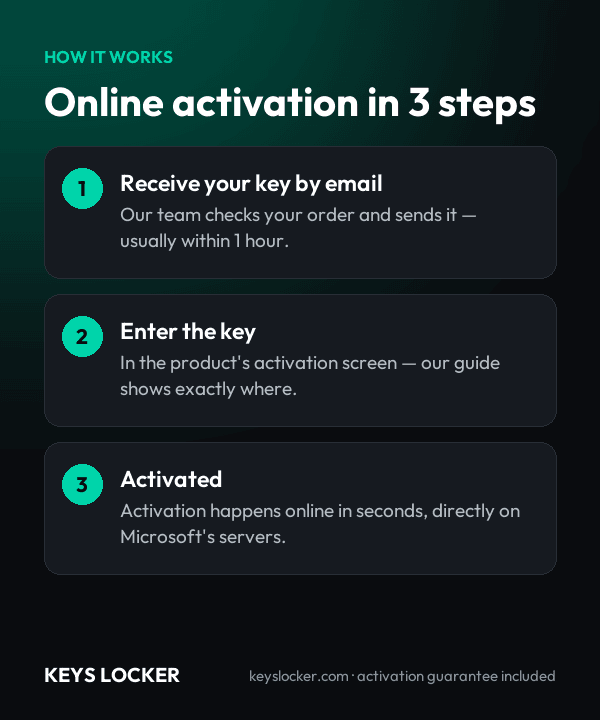
  1. Download from Microsoft
  2. Enter your Windows Server 2016 Standard key
  3. Activates through Microsoft servers

See our server guide.

Is This Key Genuine?

Genuine key. Your Windows Server 2016 Standard key activates on official servers. Covered by our activation guarantee.

  • 1 x Windows Server 2016 Standard product key in the standard 25-character format, activating one Windows Server 2016 Standard installation in Desktop Experience, Server Core or Nano Server mode.
  • Instant email delivery after payment clears, with the same key stored permanently on your account order page.
  • Written activation walkthrough covering both the graphical Settings route and the command line path (slmgr /ipk then slmgr /ato), which is the only option on a Server Core installation.
  • Guidance on sourcing official Microsoft installation media for the Windows Server 2016 long-term servicing build, so the key is applied to a genuine, unmodified image.
  • Unlocks the Standard feature set: Hyper-V with nested virtualization, Windows and Hyper-V isolated containers, Active Directory, failover clustering, IIS 10, Credential Guard and Just Enough Administration.
  • Two Hyper-V virtual machine rights on a fully core-licensed server, plus unlimited Windows Server containers - 2016 is the release that introduced them, and Hyper-V isolated containers consume one of the two OSEs.
  • Perpetual license — a one-time purchase with no renewal date, no subscription and no Microsoft 365 tenant dependency.
  • Security updates through January 12, 2027, delivered through Windows Update during the extended support phase.
  • Core licensing assumption: priced at the 16-core minimum. 2016 is the release that moved licensing off processors onto cores, so a dual-socket box with 10 cores per socket needs 20 licenses, bought in 2-core packs.
  • Not included: Windows Server 2016 CALs and RDS CALs, which Microsoft licenses separately and which are stocked on this store as their own products.
  • Licensing model: core-based. All physical cores in the server must be licensed, with a minimum of 8 core licenses per physical processor and 16 core licenses per server. Core licenses are supplied in 2-core and 16-core packs.
  • Virtualization rights: two operating system environments (two Hyper-V virtual machines) per fully licensed server. If both are used, the host installation is restricted to running and managing Hyper-V. Each additional pair of VMs requires re-licensing every physical core.
  • Client access licenses: one Windows Server 2016 CAL (User or Device) per connecting user or device, sold separately. CALs must be version 2016 or newer. Remote Desktop sessions require RDS CALs in addition to the Windows Server CAL.
  • Processor: 1.4 GHz 64-bit, x64 instruction set, supporting NX/DEP, CMPXCHG16b, LAHF/SAHF, PrefetchW and second-level address translation (Intel EPT or AMD NPT).
  • Memory: 1 GB minimum for a Server Core install, 2 GB for Desktop Experience. Windows Server 2016 addresses up to 24 TB of RAM and 512 logical processors.
  • Storage: 32 GB minimum on a PCI Express class disk, plus headroom for the page file, crash dumps and roles such as Active Directory or Hyper-V.
  • Firmware and network: UEFI 2.3.1c firmware with Secure Boot support is required for Secure Boot, and a TPM only for features such as BitLocker; a Gigabit Ethernet adapter is required; a DVD drive only if installing from physical media.
  • Installation options: Desktop Experience, Server Core, or Nano Server. 2016 is the last long-term release in which Nano Server can be installed as a host operating system rather than only as a container base image.
  • Edition boundaries: Storage Spaces Direct, Storage Replica, Shielded VM hosting and the Network Controller role are Datacenter-only in the 2016 generation and are not enabled by a Standard license.
  • Upgrade path: in-place upgrade is supported from Windows Server 2012 and 2012 R2, edition-for-edition. Standard can later be upgraded to Datacenter on the same hardware; the reverse is not supported.
  • Support lifecycle: mainstream support ended January 11, 2022; extended support, which continues to deliver security updates, ends January 12, 2027.
  • Downgrade rights: Microsoft's Product Terms permit edition-for-edition downgrade (Standard to Standard) to an earlier version, using that version's own media and activation method. The key supplied here activates Windows Server 2016 Standard.
  1. Purchase — Complete your order securely
  2. Receive Key — Your key appears on your order page right after payment, and we email you a link. Click “Reveal key” to see it
  3. Activate — Enter the key during product setup or in Settings > Activation
★

No reviews yet. Be the first to share your experience!

Be the first to review “Microsoft Windows Server 2016 Standard — Online Key”

★ ★ ★ ★ ★
How this key works

Enter the key in Server Manager or with slmgr /ipk; it activates online.

Reinstalling

After reinstalling the same server, enter the key again.

New hardware

One license covers one server.

Compare all key types — OEM, Retail, phone, Microsoft account →

Frequently Asked Questions

Windows Server 2016 was the release that moved licensing from processors to physical cores. Every physical core in the server must be licensed, with a documented minimum of 8 core licenses per physical processor and 16 core licenses per server. A single-socket machine with 6 cores still needs the 16-core minimum. Core licenses are sold in 2-core and 16-core packs.

Standard grants two operating system environments, meaning two Hyper-V virtual machines on a fully core-licensed server. If you use both VM rights, the physical host installation may only run Hyper-V and virtualization management, nothing else. For a third and fourth VM you re-license every physical core again, or you move to Datacenter, which has unlimited virtualization rights.

Mainstream support ended on January 11, 2022, but the extended support phase runs to January 12, 2027 and still delivers security updates through Windows Update. New features and free break-fix support are finished. It remains a reasonable choice for a legacy application that is pinned to this build, but plan a move to 2019, 2022 or 2025 before that date.

Datacenter adds unlimited virtualization rights plus four capabilities Standard does not carry in this generation: Storage Spaces Direct, Storage Replica, Shielded Virtual Machine hosting and the Network Controller role for software-defined networking. Everything else is identical, including Active Directory, DNS, DHCP, IIS, file services, failover clustering and Hyper-V itself.

Yes. The server license covers the operating system running on the hardware; each user or device that connects to it needs a Windows Server client access license. CALs must match or exceed the server version, so a 2016 server accepts 2016, 2019, 2022 or 2025 CALs, but 2012 R2 CALs are not valid against it.

Yes. Windows Server 2016 introduced Windows Server containers, Hyper-V isolated containers, native Docker support and nested virtualization, and it is the only long-term release where Nano Server is a host installation option rather than a container image. Windows Server containers are unrestricted; Hyper-V isolated containers count against the edition's two OSE entitlement.

Usually instantly, and at most a few minutes depending on demand and stock. Your key appears on your order page as soon as your payment is confirmed, and we email you a link to it. The key stays hidden until you click Reveal key.

Send our support team your order number and a screenshot of the activation error. Most problems are an edition mismatch or a typo, and we'll help you fix it. If the key really is faulty, we send a free replacement within 24 hours — or a full refund if we can't replace it.

7-Day Activation Guarantee

Activate your key within 7 days of purchase. If it doesn't activate, we send a free replacement — or a full refund if we can't replace it.

Recently Viewed

Scroll to Top