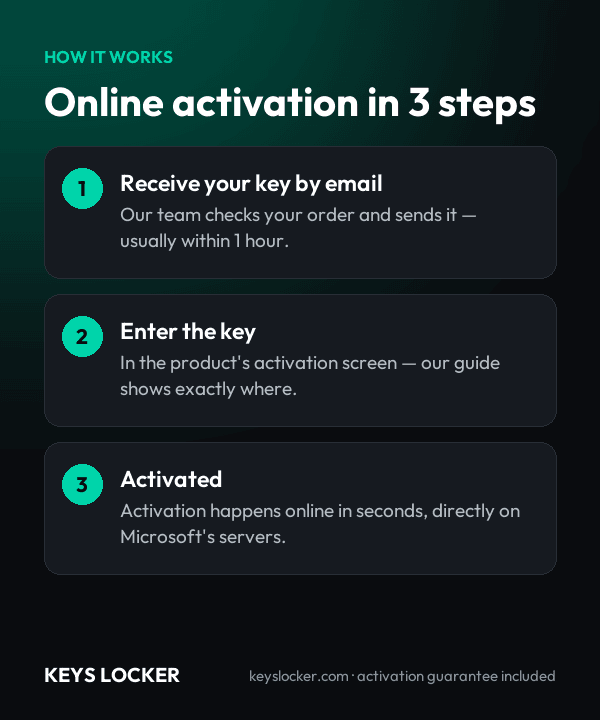
Buy RDS 2019 Device CAL Key (50 Devices) | KeysLocker
All Products
Office Windows Microsoft 365 Visio Project Server Bundles
Get CID
,

Microsoft RDS Server 2019 — 50 Device CAL — Online Key

$19.99

50 Remote Desktop Services (RDS) Device CALs for Windows Server 2019. Allows 50 devices to connect remotely, used by any user. Fast delivery.

What happens after you pay
  • Our team checks your order and emails your key — usually within a few minutes.
  • Your key and a step-by-step activation guide also stay on your order page.
Genuine Microsoft license Personal support chat 7 days to activate — guaranteed Secure checkout by Stripe
SKU: KL-RDS19-50D Categories: , Tags: , , , Brand:
Activation Online — enter the key and it activates
License One-time purchase — permanent
Covers 50 devices
Warranty Activate within 7 days — free replacement if it doesn't work
Delivery Checked by our team — usually within a few minutes

Buy RDS 2019 Device CAL — 50 Device Remote Desktop Licenses

License 50 devices with this genuine RDS 2019 Device CAL. Each RDS 2019 Device CAL lets any user connect from a licensed device to Windows Server 2019.

What You Get

  • 50x RDS Device CALs for Server 2019
  • Fast delivery
  • Device-based licensing
  • Global activation

Device vs User

How to Activate

  1. Open RD Licensing Manager
  2. Install your RDS 2019 Device CAL key
  3. CALs are ready

See our guide and Microsoft docs.

Is This Key Genuine?

Genuine Microsoft RDS 2019 Device CAL key. Covered by our activation guarantee.
  • 1 online product key for Microsoft Remote Desktop Services 2019 Per Device CAL, 50-device pack.
  • Installs 50 RDS Per Device CALs into one Windows Server 2019 or later RD Licensing server pool.
  • Entitles 50 devices to reach RD Session Hosts on Windows Server 2019, 2016 or earlier, with every user of a licensed device covered.
  • Perpetual rights to the 2019 CAL version, with no renewal date and no user count to maintain.
  • Setup guidance covering license server activation, the Install Licenses wizard, and switching the deployment to Per Device mode.
  • Delivered to your order page, usually instantly and at most a few minutes after payment. We email you a link too.
  • Not included: Windows Server 2019 itself, base Windows Server CALs, and RDS Per User CALs.
  • Version rights: valid on Windows Server 2019, 2016, 2012 R2 and older RD Session Hosts. A 2022 or 2025 host will not accept them.
  • License server: must run Windows Server 2019 or later. A 2019 license server also holds 2016 and earlier CAL packs, so one activated server can cover a mixed-generation farm.
  • Licensing mode: Per Device is set at deployment level. Each RD Session Host operates in one mode, so device-based and user-based estates need separate deployments.
  • Counting rule: 50 endpoints, not 50 concurrent sessions. Every thin client, tablet, kiosk or home PC that connects consumes a CAL until it expires or is revoked.
  • Also required: Windows Server 2019 CALs per user or device, plus Standard or Datacenter core licenses for the host.
  • Host core licensing: all physical cores licensed, minimum 8 per processor and 16 per server, in 2-core packs. Standard grants 2 operating system environments per fully licensed server, Datacenter unlimited.
  • Grace period: 120 days from the first client connection before an unlicensed host stops accepting sessions.
  • Revocation: Licensing Manager can reclaim up to 20 percent of the installed Per Device CALs of this version, which covers routine hardware replacement.
  • Graphics: RemoteFX vGPU is deprecated in Windows Server 2019 and disabled by update KB4570006. Plan GPU-dependent shared desktops around that.
  • Host capacity: up to 24 TB of RAM per host.
  • Lifecycle: Windows Server 2019 extended support ends 9 January 2029.
  1. Purchase — Complete your order securely
  2. Receive Key — Your key appears on your order page right after payment, and we email you a link. Click “Reveal key” to see it
  3. Activate — Enter the key during product setup or in Settings > Activation
★

No reviews yet. Be the first to share your experience!

Be the first to review “Microsoft RDS Server 2019 — 50 Device CAL — Online Key”

★ ★ ★ ★ ★
How this key works

The CAL pack is installed on your Remote Desktop license server with RD Licensing Manager.

Reinstalling

If you rebuild the license server, install the pack again with the same key.

New hardware

Replacing a workstation or a user does not need a new pack — the license server reassigns CALs.

Compare all key types — OEM, Retail, phone, Microsoft account →

Frequently Asked Questions

Yes. RDS CALs work downward, so a 2019 Per Device CAL licenses a 2019, 2016 or 2012 R2 session host. One license server running Windows Server 2019 or later holds this pack alongside older CAL versions and serves the whole farm, which is far simpler than maintaining a separate pool for each host generation.

A single license server can hold both types, but the licensing mode is a deployment-level setting: an RD Session Host runs in Per Device or Per User mode, never both at once. Where part of the estate is shared hardware and part is roaming staff, split them into separate deployments, each matched to the CAL type it uses.

Count distinct machines against distinct people. A ward with 50 shared clinical workstations used by 165 nurses and doctors across rotating shifts needs 50 Device CALs against 165 User CALs. Once average users per device passes one, device licensing is ahead, and a rota-driven site usually runs three or four people to every machine.

Yes. Remote Desktop Services CALs sit on top of the base licensing rather than replacing it. Every user or device reaching the server needs a Windows Server CAL, the hardware itself needs Windows Server 2019 Standard or Datacenter core licenses, and only then does the RDS CAL grant the remote session rights on top.

Remote Desktop Licensing Manager can revoke a Per Device CAL and return it to the pool straight away, subject to a cap of 20 percent of the installed CALs for that version. Past that cap you wait for the issued CAL to reach its expiry date, at which point it returns to the pool on its own.

RemoteFX vGPU was deprecated in Windows Server 2019 and later disabled outright by security update KB4570006, so graphics-heavy shared desktops need a different GPU approach than a 2016 build used. Licensing mechanics are unchanged. Server 2019 also stays in extended support until 9 January 2029, two years beyond the 2016 hosts it replaces.

Usually instantly, and at most a few minutes depending on demand and stock. Your key appears on your order page as soon as your payment is confirmed, and we email you a link to it. The key stays hidden until you click Reveal key.

Send our support team your order number and a screenshot of the activation error. Most problems are an edition mismatch or a typo, and we'll help you fix it. If the key really is faulty, we send a free replacement within 24 hours — or a full refund if we can't replace it.

7-Day Activation Guarantee

Activate your key within 7 days of purchase. If it doesn't activate, we send a free replacement — or a full refund if we can't replace it.

Recently Viewed

Scroll to Top