Buy Windows Server 2019 Standard Key | KeysLocker
All Products
Office Windows Microsoft 365 Visio Project Server Bundles
Get CID
,

Microsoft Windows Server 2019 Standard — Online Key

$9.99

Genuine Windows Server 2019 Standard license key with fast delivery. Supports up to 16 cores and 2 Hyper-V virtual machines. Ideal for small to medium business environments.

What happens after you pay
  • Our team checks your order and emails your key — usually within a few minutes.
  • Your key and a step-by-step activation guide also stay on your order page.
Genuine Microsoft license Personal support chat 7 days to activate — guaranteed Secure checkout by Stripe
SKU: KL-WINSRV19-STD Categories: , Tags: , , , Brand:
Activation Online — enter the key and it activates
License One-time purchase — permanent
Covers 1 server
Warranty Activate within 7 days — free replacement if it doesn't work
Delivery Checked by our team — usually within a few minutes

Buy Windows Server 2019 Standard Key — Reliable Business Server

Get a genuine Windows Server 2019 Standard key with fast delivery. This Windows Server 2019 Standard key gives you a proven, stable server OS with AD, Group Policy, DNS, DHCP, IIS, and 2 Hyper-V VMs — everything SMBs need.

What You Get

  • 1x genuine Windows Server 2019 Standard key
  • Fast delivery
  • 2 Hyper-V VMs
  • Global activation

Key Features

Windows Admin Center, improved Hyper-V, Storage Migration Service, System Insights, Windows Defender ATP.

Standard vs Datacenter

How to Activate

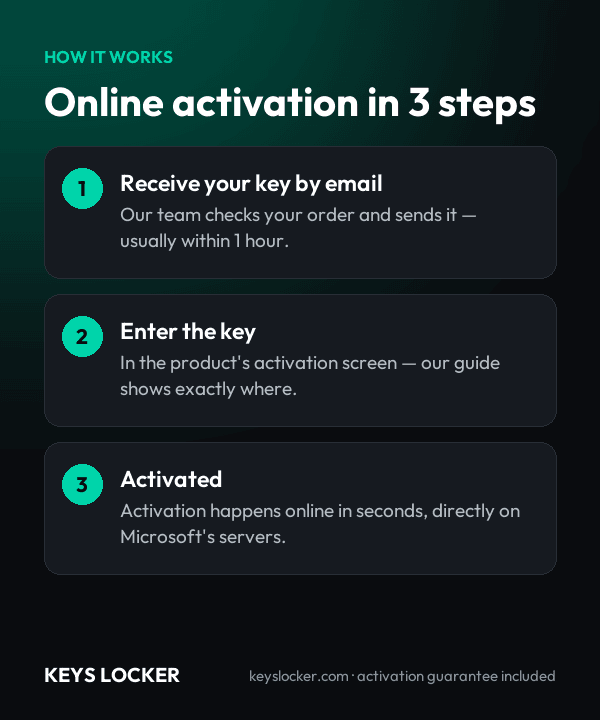
  1. Download from Microsoft
  2. Enter your Windows Server 2019 Standard key
  3. Activates through Microsoft servers

See our server guide.

Is This Key Genuine?

Genuine key. Your Windows Server 2019 Standard key activates on official servers. Covered by our activation guarantee.

  • 1 x Windows Server 2019 Standard product key in the standard 25-character format, activating a single Windows Server 2019 Standard installation in either Desktop Experience or Server Core mode.
  • Automated email delivery within minutes of payment, with the key duplicated on your account order page.
  • Activation instructions for the Settings interface and for the command line (slmgr /ipk followed by slmgr /ato), the latter being the only route available on a Server Core installation.
  • Unlocks the full 2019 Standard feature set: System Insights, Storage Migration Service, Linux containers on Windows and the Server Core App Compatibility Feature on Demand, all manageable from the free Windows Admin Center console.
  • Two Hyper-V virtual machine rights per fully core-licensed host, plus unlimited Windows Server containers on the shrunk 2019 Server Core image used for Kubernetes Windows worker nodes.
  • Perpetual license — one payment, no renewal date, no subscription and no dependency on a Microsoft 365 tenant.
  • Security updates through January 9, 2029 during Microsoft's extended support phase for Windows Server 2019.
  • Core licensing assumption: priced at the 16-core floor. Count physical cores first - a single-socket 24-core host needs 24 licenses before either 2019 VM right applies.
  • Not included: Windows Server 2019 CALs and RDS CALs. Microsoft licenses both separately from the server operating system, and both are stocked here.
  • Licensing model: per physical core. Every core in the server is licensed, with a minimum of 8 core licenses per physical processor and 16 per server. Core licenses are sold in 2-core and 16-core packs.
  • Virtualization rights: two operating system environments (two Hyper-V virtual machines) per fully licensed server, plus unlimited Windows Server containers. Using both VM rights restricts the host to Hyper-V and management duties; each further pair of VMs requires licensing the full core count again.
  • Client access licenses: one Windows Server 2019 CAL or newer per connecting user or device. Windows Server 2016 and earlier CALs are not valid against a 2019 server. Remote Desktop Services additionally requires RDS CALs.
  • Processor: 1.4 GHz 64-bit x64. NX/DEP, CMPXCHG16b, LAHF/SAHF, PrefetchW and SLAT are all mandatory - 2019 refuses to install on a CPU missing any of them, which rules out most pre-2009 silicon.
  • Memory: 1 GB minimum for Server Core, 2 GB for Desktop Experience. Windows Server 2019 addresses up to 24 TB of RAM.
  • Storage: 32 GB minimum system disk, with additional capacity for Hyper-V, Active Directory or file server workloads.
  • Firmware and network: UEFI 2.3.1c firmware supporting Secure Boot, a TPM for features such as BitLocker, and a Gigabit Ethernet adapter.
  • Installation options: Desktop Experience or Server Core, with the Server Core App Compatibility Feature on Demand available to run GUI management tools on Core. Nano Server is a container image only from 2019 onward and can no longer be installed as a host operating system.
  • Included in Standard: System Insights, Storage Migration Service, Linux containers on Windows and the Server Core App Compatibility Feature on Demand; Windows Admin Center manages the server as a free separate download. Hosting shielded VMs requires Datacenter.
  • Limited or excluded in Standard: Storage Replica is capped at one partnership, one resource group and a single volume of up to 2 TB; Storage Spaces Direct, Shielded VM hosting and software-defined networking remain Datacenter-only.
  • Upgrade path: in-place upgrade supported from Windows Server 2012 R2 and 2016, edition-for-edition. Standard can be upgraded to Datacenter later; Datacenter cannot be moved down to Standard.
  • Support lifecycle: mainstream support ended January 9, 2024; extended support runs to January 9, 2029, two years beyond the end of the Windows Server 2016 lifecycle.
  • Downgrade rights: the license may be downgraded edition-for-edition to Windows Server 2016 or 2012 R2 under Microsoft's Product Terms, using that version's own media and activation method. This key activates Windows Server 2019 Standard.
  1. Purchase — Complete your order securely
  2. Receive Key — Your key appears on your order page right after payment, and we email you a link. Click “Reveal key” to see it
  3. Activate — Enter the key during product setup or in Settings > Activation
★

No reviews yet. Be the first to share your experience!

Be the first to review “Microsoft Windows Server 2019 Standard — Online Key”

★ ★ ★ ★ ★
How this key works

Enter the key in Server Manager or with slmgr /ipk; it activates online.

Reinstalling

After reinstalling the same server, enter the key again.

New hardware

One license covers one server.

Compare all key types — OEM, Retail, phone, Microsoft account →

Frequently Asked Questions

Four additions matter most to Standard buyers: System Insights predictive analytics, the Storage Migration Service for moving file servers off aging hardware, Windows Admin Center, the free browser-based console released alongside 2019 (it also manages 2016), and a limited Storage Replica that 2016 Standard did not include at all. Linux containers on Windows and the Server Core App Compatibility feature also arrived in this release.

System Insights is a predictive analytics feature built into both 2019 editions. It runs local machine-learning models against performance counters and event data to forecast CPU, networking and storage capacity exhaustion weeks in advance, then surfaces the forecast in Windows Admin Center or PowerShell. It needs no cloud connection, no agent and no additional license.

Storage Migration Service is fully available in Standard and can inventory, transfer and cut over file servers running Windows Server 2003 or later. Storage Replica is included but deliberately capped in Standard: one replication partnership, one resource group and a single volume of up to 2 TB. Unrestricted Storage Replica and Storage Spaces Direct remain Datacenter-only features.

Yes. Windows Server 2019 supports in-place upgrade from Windows Server 2012 R2 and Windows Server 2016, keeping roles, settings and data. The upgrade is edition-for-edition, so 2012 R2 Standard or 2016 Standard becomes 2019 Standard. Take a full backup of domain controllers first and confirm every third-party agent on the box supports 2019.

You need Windows Server 2019 CALs or newer, so 2019, 2022 and 2025 CALs are all valid while 2016 CALs are not. Choose User CALs when staff connect from several devices, or Device CALs when several people share one machine such as a shift terminal. Remote Desktop sessions need RDS CALs on top.

Yes. 2019 added Linux containers on Windows, shrank the Server Core container image substantially and improved container networking. It is also the baseline host version for production Kubernetes Windows worker nodes. Windows Server containers are unlimited on Standard; Hyper-V isolated containers count against the edition's two operating system environment entitlement.

Usually instantly, and at most a few minutes depending on demand and stock. Your key appears on your order page as soon as your payment is confirmed, and we email you a link to it. The key stays hidden until you click Reveal key.

Send our support team your order number and a screenshot of the activation error. Most problems are an edition mismatch or a typo, and we'll help you fix it. If the key really is faulty, we send a free replacement within 24 hours — or a full refund if we can't replace it.

7-Day Activation Guarantee

Activate your key within 7 days of purchase. If it doesn't activate, we send a free replacement — or a full refund if we can't replace it.

Recently Viewed

Scroll to Top